





 |
Course code: troubleshoot1 Troubleshooting using commands and logs Introductory seminar |
|
 |
||
Seminar name/code |
Date/time |
Overview |
Troubleshooting introductory seminar using commands and logs |
1 day |
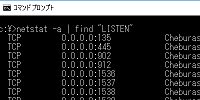
This is a troubleshooting seminar where you can learn how to isolate client/server/network problems and identify their causes on a layer-by-layer basis. Use Windows/Linux log file/event viewer and filter Learn how to isolate problems by layer and how to identify the cause for each layer. |
Textbook and equipment used |
Lecturer |
Purpose |
★Distribution ★Lunch box ★Equipment used |
|
Learn the concept of For various troubles that occur in clients (OS/applications), servers (OS/applications), and For Windows/Linux, we will use standard commands to check layer isolation and troubleshooting in a real machine environment. Learn the types of log file/event viewers, how to filter, how to investigate, and efficient investigation methods. Learn how to check program operation, output symbol information, and investigate the cause of stoppages. Learn how to isolate troubles by OSI layer and identify their causes through practical training. |
Seminar details New |
||
Troubleshooting Guidelines Isolating by layer with commands Log file types and locations |
Physical layer/layer 2 troubleshooting How to investigate a program (Appendix) Troubleshooting using packet capture |
|
Introduction to Troubleshooting with Commands and Logs
This page keeps all original information and links. Japanese page